Scheduling Models with Model-Written Scripts: A Deep Dive into Claude Code Dynamic Workflows
This article explains Claude Code’s dynamic workflows from the ground up, covering the following:
- What dynamic workflows are, and why Anthropic built them;
- What problems its main APIs each solve;
- Seven reusable quality patterns;
- How to configure and trigger it, and what runtime limits there are;
- How well it actually works in practice;
- How it relates to several of Anthropic’s articles;
- An open-source port built on top of it.
1. What problem it aims to solve
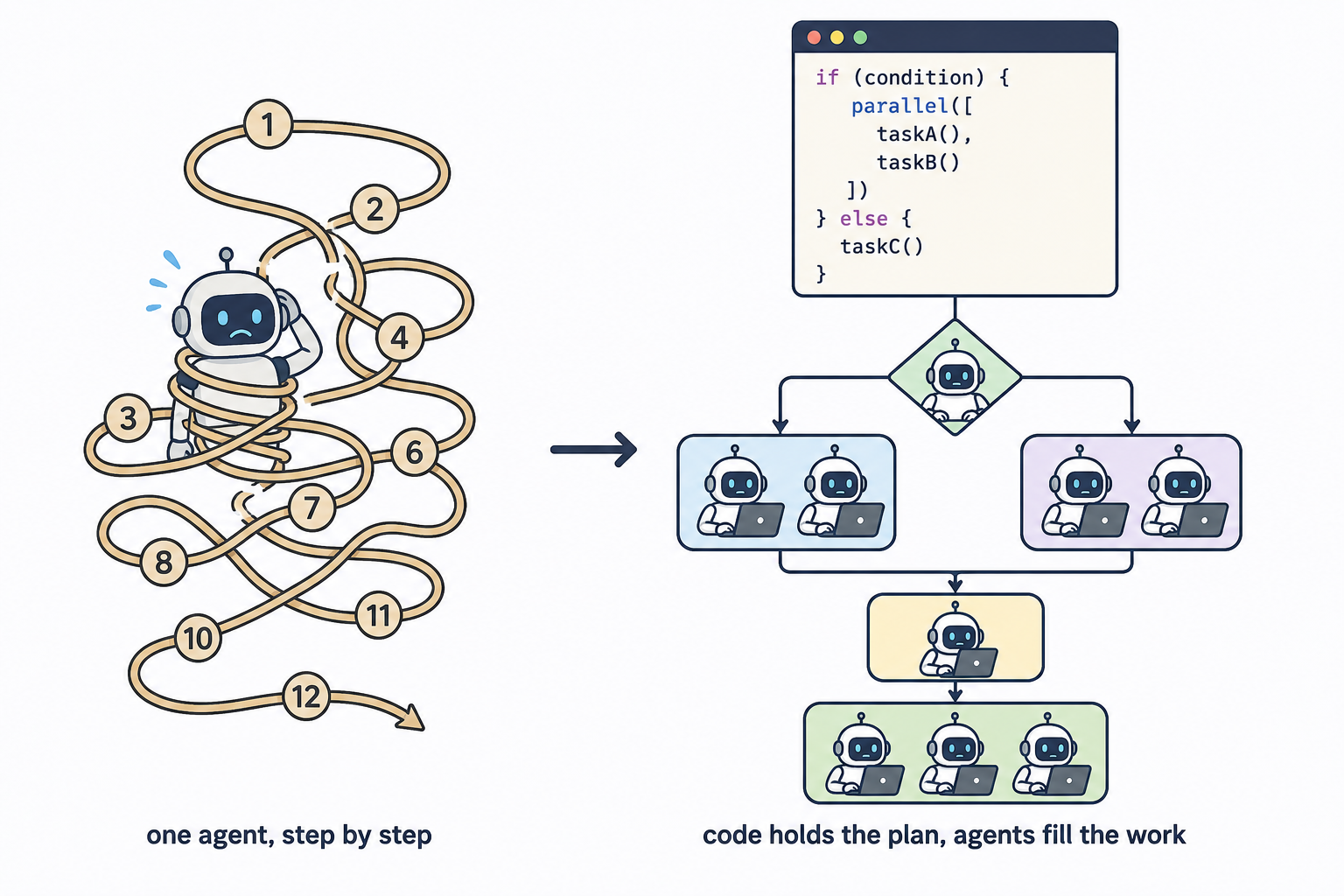
If you’ve used an AI coding assistant, you’re probably familiar with this way of working: you make a request, the model executes it step by step, and after each step it decides what comes next. This is called the “agent loop” — the model is responsible for both execution and orchestration.
For small tasks, this approach usually works. But Anthropic offers a very restrained assessment of the problem it targets:
“Some problems are too big for one pass by a single agent” — especially in “complex, legacy codebases.” (from the announcement)
The docs give a more specific “when you should use it”:
“Reach for a workflow when a task needs more agents than one conversation can coordinate, or when you want the orchestration codified as a script you can read and rerun.”
The official docs sum up its approach in a single sentence:
“A workflow moves the plan into code.”
Concretely: you (or the model itself) write an ordinary JavaScript script that lays out “which tasks run in parallel, which run serially, how many times to loop, and when to stop”; each individual step — reading code, looking things up, judging right from wrong — is handed off to an independent subagent.
The full official definition is:
“A dynamic workflow is a JavaScript script that orchestrates subagents at scale. Claude writes the script for the task you describe, and a runtime executes it in the background while your session stays responsive.”
2. How it differs from “subagents,” “skills,” and “agent teams”
Claude Code has more than one mechanism for doing multi-step tasks. The official docs offer a comparison table whose core distinction is “who holds the plan”:
| Subagents | Skills | Agent teams | Workflows | |
|---|---|---|---|---|
| What it is | A worker Claude spawns | Instructions Claude follows | A lead agent supervising peer sessions | A script the runtime executes |
| Who decides what runs next | Claude, turn by turn | Claude, following the prompt | The lead agent, turn by turn | The script |
| Where intermediate results live | Claude’s context window | Claude’s context window | A shared task list | Script variables |
| What’s repeatable | The worker definition | The instructions | The team definition | The orchestration itself |
| Scale | A few delegated tasks per turn | Same as subagents | A handful of long-running peers | Dozens to hundreds of agents per run |
| Interruption | Restarts the turn | Restarts the turn | Teammates keep running | Resumable in the same session |
The official explanation of this table:
“With subagents, skills, and agent teams, Claude is the orchestrator: it decides turn by turn what to spawn or assign next, and every result lands in a context window. A workflow script holds the loop, the branching, and the intermediate results itself, so Claude’s context holds only the final answer.”
“Moving the plan into code also lets a workflow apply a repeatable quality pattern, not just run more agents: it can have independent agents adversarially review each other’s findings before they’re reported, or draft a plan from several angles and weigh them against each other, so you get a more trustworthy result than a single pass.”
These two passages are the official basis for the “quality patterns” section later on.
3. Its core API (six primitives)
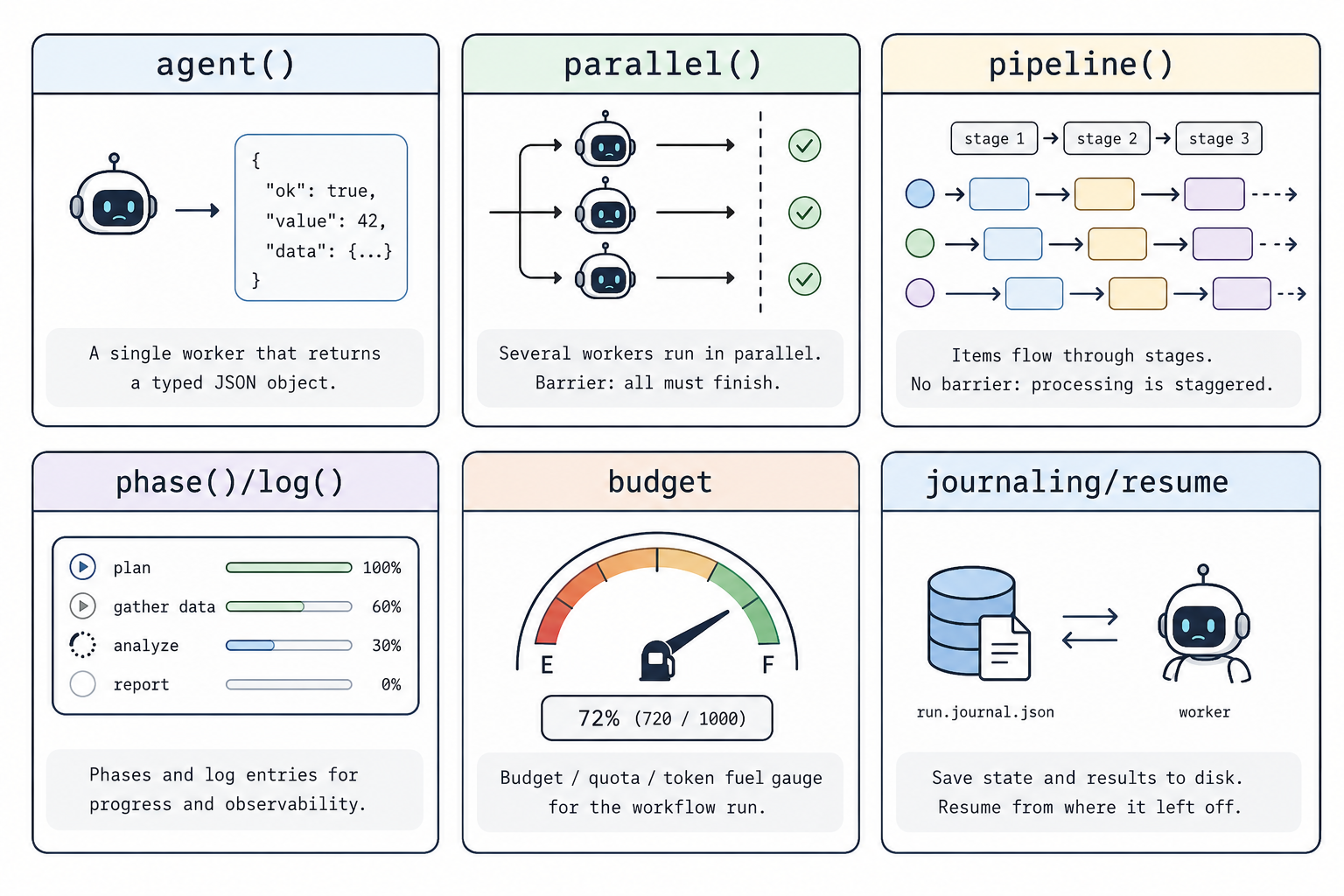
There aren’t many “primitives” (basic building blocks) available in a workflow script, but each one corresponds to a specific engineering problem.
Source note (important): The function names below (
agent,parallel,pipeline, etc.) and their exact signatures come from the spec that ships with the Claude Code workflow tool—that is, the tool manual Anthropic wrote for the model to read, not some public blog post. The public workflow documentation is written for end users and deliberately does not list these function signatures. This point is discussed specifically in the “Source note” at the end of the article, along with how to verify it. The verbatim original text is at the end of this section.
3.1 agent: a typed model call
agent(prompt, { schema }) is used to dispatch a sub-model, giving it its own independent context window.
- Without
schema: returns a piece of text—you have to parse it yourself, and parsing may fail. - With
schema(a JSON Schema): the tool layer forces the model to go through the structured-output tool and makes it retry if the output doesn’t conform, finally returning a validated object directly.
The point of this is: downstream deduplication, counting, and filtering can all be handled by deterministic code, without relying on fragile string parsing. If the output of every step were unreliable text, the subsequent orchestration logic would have a hard time running stably.
3.2 parallel / pipeline: parallelism and barriers
parallel and pipeline are both used to run tasks in parallel; the only difference is whether to wait for all tasks to complete.
parallel(with a barrier): returns only after all thunks complete. Suitable for scenarios that “need the full set of results”—global deduplication, vote tallying, or early exit on zero results.pipeline(no barrier): each item passes through all stages independently, with no waiting between stages. Item A may already be at stage three while item B is still at stage one.
Why is pipeline the default choice? Because its total time is close to that of the single slowest processing chain, rather than the sum of the “slowest task in each stage.” If every stage had a barrier, already-completed items would wait for slower items, and overall efficiency would drop. Only when a stage genuinely needs cross-item information from the previous stage (deduplication / tallying / comparing against each other) do you need a barrier.
3.3 phase / log: observability of the run
phase("search") marks the current phase, and log("...") emits a line of progress. These aren’t decoration: with this information, the /workflows progress panel can group by phase, and you can drill into each sub-model to inspect its prompt and result. This corresponds to transparency among Anthropic’s three principles.
3.4 budget: controlling execution scale by budget
budget provides total, spent(), and remaining(). Two ways to use it:
- Static:
const FLEET = total / 100k, deciding how many models to launch based on the budget; - Dynamic:
while (budget.remaining() > 50_000) { ... }, reading the remaining budget during the run.
The budget is used to limit whether to keep launching new agent() calls: once the budget is reached, subsequent calls will fail. Note that the actual spend can still be affected by agents that have already started but not yet finished while running concurrently—that is, the total spend may exceed the budget line; the size of the overshoot depends on the concurrency and the output length of the agents already launched, with the run panel’s statistics being authoritative.
3.5 journaling / resume: automatic saving and resuming
The result of every agent() call is automatically saved. When the call sequence stays consistent, completed calls can be reused; after you change the script, you can usually reuse the longest unchanged prefix, and only the first change and everything after it are re-executed. This is an important difference from “one-shot execution”: it is deterministic and resumable.
3.6 The verbatim function API
For traceability, here are the exact signatures of the six primitives above, listed verbatim. The English original below comes from the “Script body hooks” section of the tool spec:
1
2
3
4
5
6
7
8
9
10
11
12
13
14
15
16
17
18
19
20
21
22
23
- agent(prompt: string, opts?: {label?, phase?, schema?: object, model?,
        effort?, isolation?: 'worktree', agentType?}): Promise<any>
    Without schema, returns its final text as a string. With schema (a JSON
    Schema), the subagent is forced to call a StructuredOutput tool and
    agent() returns the validated object — no parsing needed. Returns null
    if the user skips the agent mid-run or the subagent dies on a terminal
    API error after retries (filter with .filter(Boolean)).

- pipeline(items, stage1, stage2, ...): Promise<any[]>
    run each item through all stages independently, NO barrier between
    stages. Item A can be in stage 3 while item B is still in stage 1.
    This is the DEFAULT for multi-stage work.

- parallel(thunks: Array<() => Promise<any>>): Promise<any[]>
    run tasks concurrently. This is a BARRIER: awaits all thunks before
    returning. A thunk that throws resolves to `null` … .filter(Boolean).

- log(message: string): void      — emit a progress message to the user
- phase(title: string): void      — start a new phase; subsequent agent()
                                     calls are grouped under this title
- args: any                       — the value passed as Workflow's `args`
- budget: {total: number|null, spent(): number, remaining(): number}
- workflow(nameOrRef, args?): Promise<any>  — run another workflow inline
(Note: the complete signatures include the full opts fields beyond the commonly seen simplified version, plus the workflow() inline call—you can run another workflow inside a workflow.)
3.7 Inline calls and resume details
The signatures in 3.6 above are the hooks you can use directly in a script. The spec has a few finer points that most explanatory material (including many secondhand introductions) doesn’t mention; this section fills them in.
① workflow(nameOrRef, args?)—inline-execute another workflow inside a workflow. The last line, workflow(nameOrRef, args?): Promise<any>, is not just a “call”; it supports executing a saved workflow or a script reference as a sub-step and returning its result. This means workflows can be composed: you can write “audit a single directory” as one workflow, then write an outer workflow that inline-calls it for dozens of directories separately. As for how an inline workflow’s resources are shared (whether they share the concurrency cap, agent count, and token budget) and whether multi-level nesting is allowed, these are runtime implementation details, governed by the actual behavior of the official runtime—this article makes no assertions about these constraints.
② resumeFromRunId—the specific mechanism for resuming from a checkpoint. Section 3.5 mentioned “when the call sequence is consistent, completed calls can be reused”; here is how that’s implemented. Every workflow run has a run number (runId), and the result of each agent() call is saved as a record keyed by “call index + prompt + options.” When you rerun with resumeFromRunId:
- The longest unchanged prefix—that is, the run of
agent()calls from the start whose arguments are exactly the same as last time—returns cached results directly, without sending requests again; - The first changed call, and all calls after it, are re-executed live.
Why “the longest unchanged prefix” rather than “all hits”? Because each agent()’s cache key contains the call index (which agent() it is in the script). The first half of the script is unchanged, so the index and content are the same, and it hits; you change one prompt in the middle, and from that line onward the content following the index all changes, so re-execution starts from there. This is the foundation of its “deterministic + resumable” nature—it doesn’t return the previous results verbatim, but reuses them call by call, position-sensitively.
An easy point of confusion: this
resumeFromRunIdis for “re-executing after changing the script” (for example, you tweaked a prompt and want to re-execute only the changed part, saving time and tokens). It’s a different thing from the “stop mid-run and resume withp” discussed in 6.2 earlier—the latter is recovery after the same script is interrupted, while the former is incremental execution after the script itself is modified.
③ A common claim that needs correcting. Many introductions (including some early notes) say “there are 4 quality patterns” and “the function signatures are just the six: agent/parallel/pipeline/phase/log/budget.” After checking verbatim against the spec, both points are inaccurate:
- There are 7 quality patterns, not 4—the ones often left out are
perspective-diverse verify(multi-perspective verification),loop-until-dry(stop only when there are no new results), andno silent caps(no silent truncation). Section 4 of this article has filled in all 7. - There are more than six function signatures—
agent()has a full set ofoptsfields (label / phase / schema / model / effort / isolation / agentType), plus theworkflow()inline call andresumeFromRunIdresume. Sections 3.6 + 3.7 of this article give the complete version.
I write out this correction because it illustrates precisely why “sources” matter: these details exist only in the tool spec, not in the public documentation, so secondhand retellings easily lose them or get them wrong.
Here is my faithful translation of the assigned block (lines 161–307):
4. Where Quality Comes From: Seven Reusable Patterns
Simply adding more models does not automatically improve result quality. The key to dynamic workflows is that these primitives can be composed into reusable quality patterns. The tool spec lists seven of them verbatim (they are the “common shapes” named in the spec, not API functions — the script author has to compose them out of the primitives).
First, the 4 that get named most often:
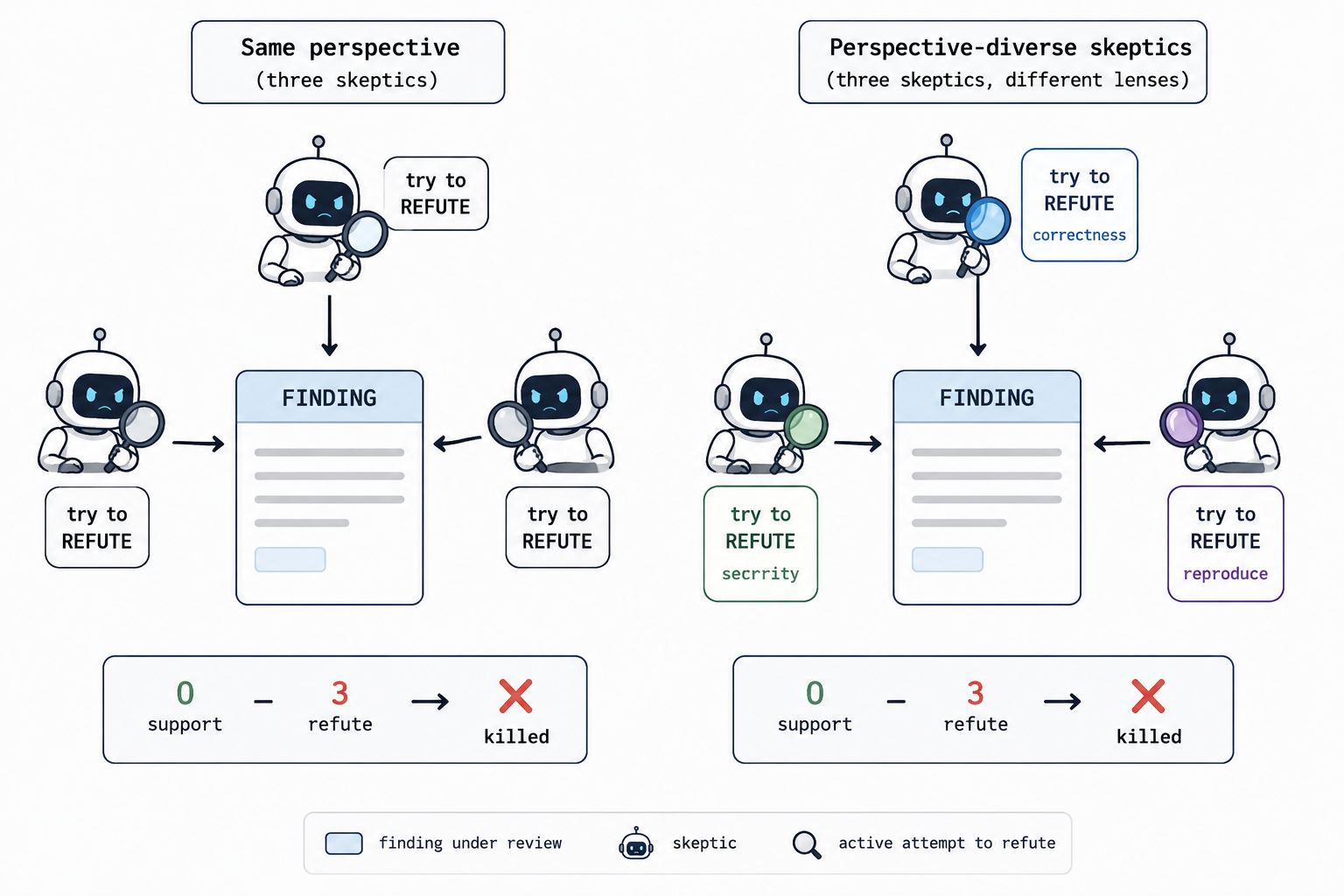
1) Adversarial verify For each “finding,” spawn N independent skeptics; the prompt requires them to refute it, and it’s discarded if a majority refute successfully.
- Why: to filter out conclusions that “look right but are actually wrong.”
- Relation to the articles: it can be seen as an adversarial variant of the evaluator-optimizer in Building effective agents (an inference; the original articles don’t state this explicitly).
2) Judge panel Independently generate N attempts from different angles, score them in parallel, then synthesize the result from the highest-scoring attempt (and can also absorb the valuable parts of other attempts).
- Why: when there are many candidate solutions, comparing multiple attempts is often more robust than “generate one attempt first and then revise it repeatedly.”
- Relation to the articles: corresponds to voting under parallelization (running the same task multiple times to get diverse outputs).
3) Multi-modal sweep Multiple models each use one retrieval angle (by directory / by content / by entity / by time) to search in parallel, without sharing intermediate conclusions with one another.
- Why: a single retrieval angle easily misses information.
- Relation to the articles: corresponds to “the lead agent spawns subagents to investigate in parallel from different angles” in Multi-agent Research System.
4) Completeness critic At the end, spawn a dedicated model to check “what’s missing — which angle wasn’t covered, which conclusion wasn’t verified, which source wasn’t read.” The gaps it identifies are the tasks to fill in the next round.
- Relation to the articles: corresponds to evaluator-optimizer / reflection.
The other 3 (also in the spec, often overlooked):
5) Perspective-diverse verify When a finding could be wrong in multiple ways, give each verifier a different checking lens (correctness / security / performance / does-it-reproduce) instead of spawning N identical verifiers. Diverse checking lenses make it easier to surface different kinds of problems. (It is the perspective-diverse version of adversarial verify.)
6) Loop-until-dry For discovery-type tasks of unknown scope (finding bugs, finding edge cases), stop only after K consecutive rounds return nothing new. Simply fixing the number of iterations easily misses problems that only show up later.
7) No silent caps If the workflow bounds coverage (top-N only, no retry, sampling), use log() to spell out what was dropped. Otherwise “silent capping” gets misread as “full coverage.”
4.1 The Seven Patterns, Verbatim
Below is the verbatim text of the “Quality patterns” section from the tool spec:
1
2
3
4
5
6
7
8
9
10
11
12
13
14
15
16
17
Quality patterns — common shapes; pick by task and compose freely:

- Adversarial verify: spawn N independent skeptics per finding, each
  prompted to REFUTE. Kill if ≥majority refute.
- Perspective-diverse verify: give each verifier a distinct lens
  (correctness, security, perf, does-it-reproduce).
- Judge panel: generate N independent attempts from different angles,
  score with parallel judges, synthesize from the winner while grafting
  the best ideas from runners-up.
- Loop-until-dry: keep spawning finders until K consecutive rounds
  return nothing new.
- Multi-modal sweep: parallel agents each searching a different way
  (by-container, by-content, by-entity, by-time).
- Completeness critic: a final agent that asks "what's missing — modality
  not run, claim unverified, source unread?"
- No silent caps: if a workflow bounds coverage (top-N, no-retry,
  sampling), log() what was dropped.
4.2 Loop-until-dry example: dedup with seen
The example in the tool spec combines loop-until-dry with “adversarial verify”:
1
2
3
4
5
6
7
8
9
10
11
12
13
14
15
16
const seen = new Set(), confirmed = []
let dry = 0
while (dry < 2) {                                      // stop only after 2 consecutive rounds with no new findings
  const found = (await parallel(FINDERS.map(f => () =>
    agent(f.prompt, {phase: 'Find', schema: BUGS})))).filter(Boolean).flatMap(r => r.bugs)
  const fresh = found.filter(b => !seen.has(key(b)))   // dedup against everything ever seen
  if (!fresh.length) { dry++; continue }
  dry = 0; fresh.forEach(b => seen.add(key(b)))
  const judged = await parallel(fresh.map(b => () =>
    parallel(['correctness','security','repro'].map(lens => () =>     // verify once with each of the three lenses
      agent(`Judge "${b.desc}" via the ${lens} lens — real?`, {phase: 'Verify', schema: VERDICT})))
      .then(vs => ({ b, real: vs.filter(Boolean).filter(v => v.real).length >= 2 }))))
  confirmed.push(...judged.filter(v => v.real).map(v => v.b))
}
return confirmed
// dedup against seen, not confirmed — otherwise findings the panel rejected resurface every round and the loop never converges.
The comment at the end of the example is the key point: dedup against “everything ever seen” (seen), not against “what passed verification” (confirmed). Otherwise, a finding the panel rejected — because it’s not in the passed list — gets treated as a “new finding” again in the next round, and the loop may never terminate. This comment is actually written in the tool spec’s example; it is not made up.
4.3 The /deep-research workflow skeleton
The following explains how these primitives compose, using the real script of the built-in /deep-research workflow. The script comes from a file that Claude automatically saves locally after a /deep-research run (the path looks like ~/.claude/projects/<project>/<session>/workflows/scripts/deep-research-<runId>.js, about 350 lines). What follows is not a verbatim excerpt but an abridged pseudocode rewritten to match the real script’s structure: it keeps the orchestration skeleton and omits the prompt bodies, JSON Schema definitions, and error handling.
1
2
3
4
5
6
7
8
9
10
11
12
13
14
15
16
17
18
19
20
21
22
23
24
25
26
27
28
29
30
31
32
33
34
35
36
37
38
39
40
41
// Phase 0: decompose — break the question into 5 search angles (structured output)
phase("Scope")
const scope = await agent(
  `Break this research question into 5 complementary search angles: ${QUESTION} ...`,
  { label: "scope", schema: SCOPE_SCHEMA }   // returns { angles: [...] }
)

// Phases 1+2: pipeline — each angle does "search → dedup → fetch", no barrier between stages
const searchResults = await pipeline(
  scope.angles,
  // stage one: search by this angle
  angle => agent(SEARCH_PROMPT(angle), { phase: "Search", schema: SEARCH_SCHEMA }),
  // stage two: URL dedup (pure code, no model cost) + bounded by the fetchSlots budget, then fetch in parallel
  searchResult => {
    const novel = searchResult.results.filter(r => !seen.has(normURL(r.url)) && fetchSlots-- > 0)
    return parallel(novel.map(src => () =>
      agent(FETCH_PROMPT(src), { phase: "Fetch", schema: EXTRACT_SCHEMA })   // extract several claims
    ))
  }
)

// Phase 3: Verify — spawn 3 adversarial verifiers to vote on each claim
// the barrier here is intentional — claims must all be gathered, ranked, and the top N taken before verification can start.
phase("Verify")
const voted = await parallel(
  rankedClaims.map(claim => () =>
    parallel(                                  // inner parallel: run 3 votes for the same claim
      Array.from({ length: 3 }, (_, v) => () =>
        agent(VERIFY_PROMPT(claim, v), { phase: "Verify", schema: VERDICT_SCHEMA })
      )
    ).then(verdicts => {
      const refuted = verdicts.filter(Boolean).filter(v => v.refuted).length
      return { claim, survives: refuted < 2 }  // reject if ≥2 votes refute
    })
  )
)
const confirmed = voted.filter(v => v.survives)

// Phase 4: synthesize — combine the verified claims into a cited report
phase("Synthesize")
return await agent(`Synthesize these verified claims into a report: ${confirmed}`, { schema: REPORT_SCHEMA })
This skeleton maps to several mechanisms covered earlier:
- It is the “five phases”: Scope → Search → Fetch → Verify → Synthesize, where each
phase()corresponds to a column on the progress panel. pipelineis used for Search→Fetch: once an angle finishes searching it immediately fetches, without waiting for the other angles — corresponding to the “no barrier” discussed in 3.2.parallelis used for Verify, with a barrier on purpose: in the real script there’s a comment here —Barrier here is intentional— because all claims must be gathered and ranked before they can be verified. This is exactly the real-world example of “only put up a barrier when you need information across items” mentioned in 3.2.- Adversarial verify is a nested parallel: the outer layer runs one parallel task per claim, and the inner layer opens 3 parallel votes per claim — corresponding to pattern 1 in Section 4.
- Dedup is pure code (
seen/normURL), consuming no model — because the upstreamschemaguarantees structured output, the downstream can process it deterministically like this.
The full script (with all prompts and Schemas) can be viewed via View raw script after Claude runs
/deep-research. This section is abridged pseudocode following the real structure, for easier reading.
5. How to Trigger It
Claude Code offers several ways to trigger a workflow.
5.1 Explicit trigger in a single prompt
Add the keyword ultracode to your prompt, or just say in natural language “use a workflow to…” (natural language is treated as an equivalent opt-in). Example:
1
ultracode: audit every API endpoint under src/routes/ for missing auth checks
- The keyword is highlighted in the input box, and Claude switches to “writing a script” instead of working turn by turn.
- Undo the highlight: press
Option+Won macOS, orAlt+Won Windows/Linux; or just backspace right after the highlighted keyword. - Turn the trigger off entirely: disable “Ultracode keyword trigger” in
/config. - Version difference: before v2.1.160 the literal trigger word was
workflow; afterward it changed toultracode; natural language works in both versions.
5.2 Enable automatic orchestration for the current session
1
/effort ultracode
- Ultracode =
xhighreasoning effort + automatic workflow orchestration. Once enabled, for every substantial task Claude automatically decides whether a workflow is needed (one request may be split into several workflows — “understand the code / modify / verify” — run in sequence). - Each request costs more tokens and is slower.
- It lasts only for the current session; a new session resets it. When you return to routine tasks, you can switch back with
/effort high. - This option is only available on models that support
xhigh.
5.3 Run an existing workflow command
- Built-in:
/deep-research <question> - Ones you’ve saved yourself:
/<name>
5.4 Approval before running
Every run pops up a “plan preview” listing the phases that will execute, plus options:
- Yes, run it: start the run
- Yes, and don’t ask again: don’t ask again for this workflow in the current project
- View raw script: read the script before running (
Ctrl+Gopens it in your editor;Tablets you still edit the prompt before running) - No: cancel
Whether this dialog appears depends on the permission mode:
| Permission mode | When it prompts |
|---|---|
| Default / accept edits | Asks on every run, unless you’ve chosen “don’t ask again” |
| Auto | Asks only the first time; any Yes is recorded in settings and it won’t ask again afterward; skipped entirely when ultracode is on |
Bypass permissions / claude -p / Agent SDK | Never asks, runs directly |
An easy point to miss: the permission mode only affects the confirmation when a workflow starts. The subagents a workflow spawns always run in
acceptEditsmode — file edits are auto-approved, and they inherit your tool allowlist. Shell commands / web fetches / MCP tools not on the allowlist can still pop up a permission prompt mid-run — before a long run, it’s best to add the commands you’ll need to the allowlist first.
5.5 Saving for reuse and passing arguments
Once you get a result you’re happy with: /workflows → select that run → press s to save. Two locations (Tab to switch):
.claude/workflows/(in-project, available to anyone who clones the repo)~/.claude/workflows/(home directory, available to all projects, visible only to you)
After saving, it becomes a /<name> command. A saved workflow can take input via args, which the script reads as the global args — Claude passes the input as structured data, so the script can apply array/object methods to it directly, without parsing it itself.
6. How It Runs, and Its Limits
- The workflow runtime executes the script in an isolated environment, separate from your conversation. Intermediate results stay in script variables instead of landing in Claude’s context.
- Every run saves the script locally. The path looks like
~/.claude/projects/<project>/<session>/workflows/scripts/<workflow-name>-<runId>.js(e.g.deep-research-wf_432fa07b-d28.js). Claude gets this path at startup — you can ask it for the path, then open and read the script, compare it with the previous one, and after editing have Claude re-run from the edited version. - The runtime tracks each agent’s result, which is the underlying support for “resumable within the same session.”
A few limits the runtime enforces:
| Limit | Why |
|---|---|
| No human input mid-run | Only permission prompts can pause it; if you need “sign-off between phases,” split each phase into a separate workflow |
| The script itself can’t touch the filesystem/shell | Reads, writes, and running commands are all done by subagents; the script only orchestrates |
| At most 16 concurrent (fewer if you have few CPU cores) | Limits local resource usage |
| At most 1000 agents per run | Prevents a script from continuously creating agents due to a loop bug |
6.1 Managing a run (/workflows panel keys)
| Key | Action |
|---|---|
↑ / ↓ | Select a phase or agent |
Enter / → | Enter a phase / agent’s details to see its prompt, recent tool calls, and result |
Esc | Go back one level |
p | Pause / resume the entire run |
x | Stop the selected agent; stop the whole workflow when focus is on the run |
r | Restart the selected running agent |
s | Save this run’s script as a command |
6.2 Resuming and cost
Resuming: after stopping, you can resume — completed agents return cached results, and the rest execute in real time. It only works within the same session; after you exit Claude Code, the next session has to execute from scratch.
Cost: a run launches many agents, noticeably more token-expensive than doing the same thing in a conversation, and it counts toward your plan’s usage and rate limits. The official advice is to try it on a small-scope task first (a single directory, a narrow question); /workflows shows each agent’s real-time tokens, and you can stop at any time without losing completed work. Each agent uses your current session’s model by default, unless the script specifies a different model for a given phase.
7. Configuration Requirements and Checklist
7.1 Environment requirements
- Version: Claude Code v2.1.154 or higher.
- Plan: available on all paid plans. Max / Team / Enterprise have it on by default; Pro users need to manually turn on “Dynamic workflows” in
/config. - Backend: Anthropic API, Amazon Bedrock, Google Cloud Vertex AI, and Microsoft Foundry are all supported.
- Interfaces: CLI, desktop app, IDE extensions,
claude -pnon-interactive mode, and the Agent SDK. - The built-in
/deep-researchadditionally requires the “web search” tool to be available.
7.2 Pre-flight checklist
claude --versionto confirm ≥ v2.1.154.- Confirm Dynamic workflows is on in
/config(off by default for Pro). - If you want automatic orchestration, also enable
/effort ultracode(optional, more token-expensive). - If you want to run
/deep-research, confirm the web search tool is available. - Add the shell commands / MCP tools your agents will use to the allowlist in advance, otherwise a long run may be interrupted by a permission prompt.
/modelto confirm the current model (which determines each agent’s unit price).
7.3 How to turn it off
- Turn off Dynamic workflows in
/config(persists across sessions). - Set
"disableWorkflows": truein~/.claude/settings.json. - Environment variable
CLAUDE_CODE_DISABLE_WORKFLOWS=1. - Org-wide: set the same option in managed settings, or use the admin console toggle.
- Once off: built-in workflow commands are unavailable, the
ultracodekeyword no longer triggers, andultracodeis gone from the/effortmenu.
8. End-to-End Run and Verification
8.1 Running the built-in /deep-research
1
/deep-research What changed in the Node.js permission model between v20 and v22?
- Run: enter the command.
- Approve: choose Yes in the dialog.
- Watch progress:
/workflows→ use the arrow keys to select this run →Enterto open the progress view. You can see the number of agents, the total tokens, and the elapsed time for each phase; enter any phase to see what each agent found. - Read the report: once the run finishes, the report lands in the session, with source citations for every conclusion, and conclusions that didn’t pass cross-verification have already been filtered out.
This flow also lets you verify that your environment is ready: if the approval dialog appears, /workflows shows progress, and a report is produced at the end, the basic flow works.
8.2 Generating a workflow for a specific task
1
ultracode: audit every API endpoint under src/routes/ for missing authentication checks
- After the keyword is highlighted, Claude writes a script instead of working turn by turn.
- In the approval dialog, click View raw script to read the script first and confirm the orchestration logic matches your expectations — this is the key step for verifying “what it’s actually going to do.”
- Click Yes to let it run, then track progress in
/workflows. - If the result is what you expected → select it →
sto save it as a reusable command.
8.3 Verification and debugging tips
- Verify with a small-scope task first: run a single directory / a narrow question first, confirm the output is correct and estimate the cost, then scale up to the whole repo.
- Read the script: every run’s script is saved locally; have Claude give you the path, then open it to read / compare / rerun after editing.
- Inspect agent by agent: in
/workflows, open an individual agent’s details to see its prompt, tool calls, and returned results, which makes problems easier to locate. - Stop and resume:
xstops without losing completed work;ppauses and you can still resume afterward.
9. Results in Practice: Two Real Cases
9.1 Official case: porting Bun from Zig to Rust
This is the case from Anthropic’s announcement. Bun’s author, Jarred Sumner, used dynamic workflows to port Bun from Zig to Rust:
- about 750,000 lines of Rust code;
- 11 days from the first commit to merge;
- existing tests 99.8% passing;
- used hundreds of parallel models, with two reviewers per file.
He chained several workflows together: one to annotate each struct field with its Rust lifetime; one that used hundreds of models to write behavior-equivalent ported code, with two reviews per file; a “fix loop” to get the build and tests passing; and one that ran overnight to remove redundant copies and open PRs automatically. (The announcement notes that this port is “not yet in production.”)
The announcement has a line that captures the value it targets:
“Work you’d normally plan in quarters now finishes in days.”
Keep it in perspective: this is product-announcement wording; it represents a high-investment scenario, not a typical experience. But the case itself (the numbers, the process) is concrete and verifiable.
Another piece of customer feedback (from Klarna, cited in the announcement): “Dynamic workflows have been especially valuable for discovery and review tasks across large codebases,” and it finds dead code that static analysis misses. In the announcement, an engineer at CyberAgent summed up its positioning: “Dynamic workflows fill the gap between firing off a single subagent and building out a full agent team” — that is, a middle layer.
9.2 A hands-on /deep-research run
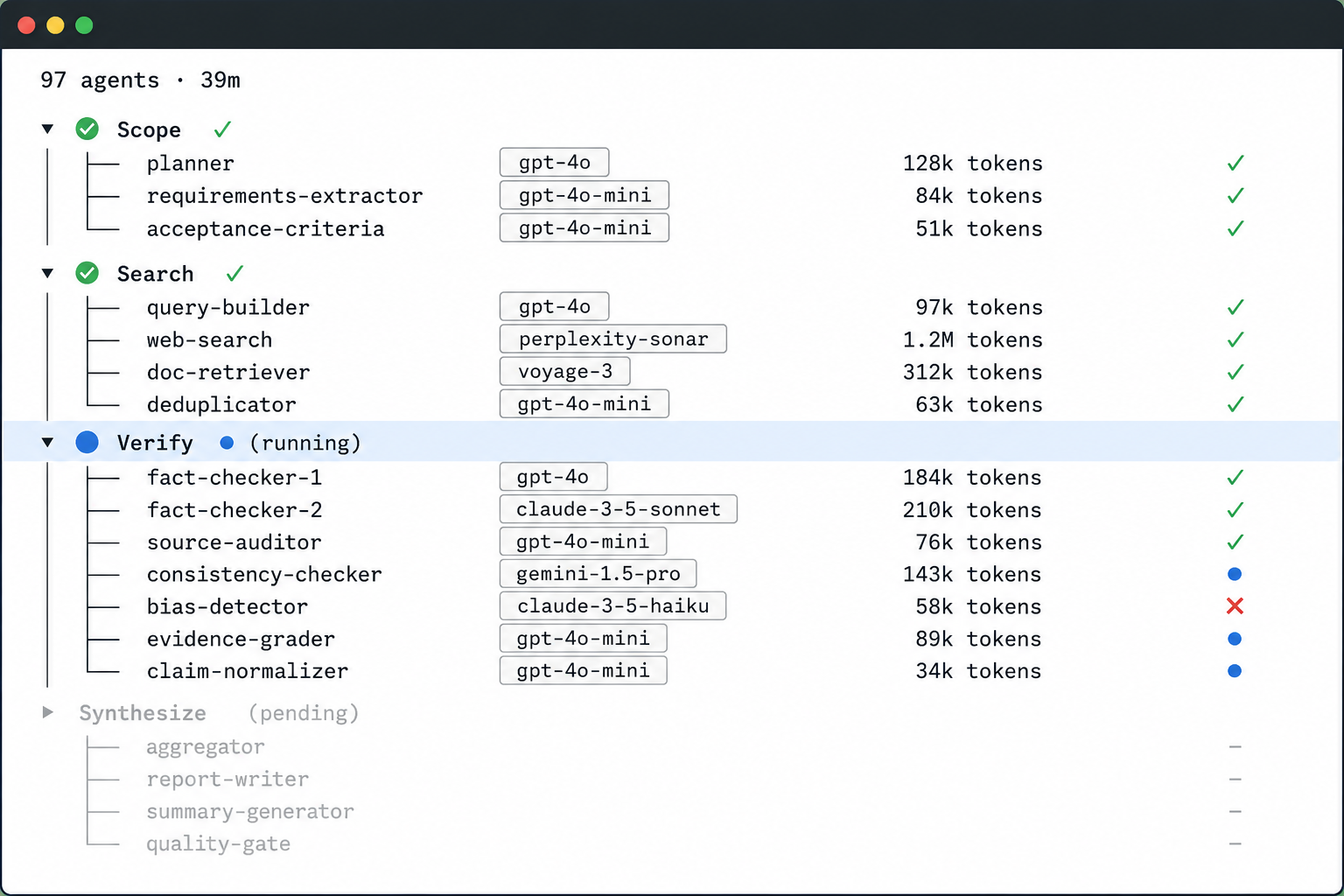
Beyond the official case, I also actually ran the built-in /deep-research once myself, with the question “compare the three frameworks LangGraph, CrewAI, and LlamaIndex Workflows.” The objective data (run ID wf_432fa07b-d28):
- launched 97 models in total, about 3.2 million tokens, and roughly 39 minutes of elapsed time;
- 5 search angles → 15 sources retrieved → 74 conclusions extracted → 25 of them put through three-vote adversarial verification;
- in the end, 24 passed and 1 was rejected.
Two observations from this run:
First, scheduling is deterministic. The total number of models launched exactly equals the formula implicit in the script: 1 (decompose) + 5 (search) + 15 (fetch) + 25×3 (verify) + 1 (synthesize) = 97. It wasn’t decided on the fly by a model. This confirms that “the code holds the plan.”
Second, adversarial verification filtered out a wrong conclusion. One plausible-sounding claim — “CrewAI has only two orchestration modes and no native conditional branching” — was unanimously rejected by three independent verifiers (0 in favor, 3 against), because CrewAI’s Flows do have a native branching primitive. Without this verification step, this wrong conclusion would have made it into the final report.
This run also had a limitation: some WebSearch calls returned placeholder results with no actually-browsed content. The final report relied mainly on WebFetch to pull official docs and gh api to read source code directly to fill in the evidence. So this run was a reasonably thorough verification of “how the workflow mechanism works”; the conclusions on choosing among the three frameworks should still defer to each project’s latest official documentation.
10. How It Resembles a Few of Anthropic’s Engineering Articles
Note: Both articles are publicly verifiable; but the correspondence between dynamic workflows and them is an after-the-fact comparison, not an official design lineage from Anthropic.
These two Anthropic engineering articles help in understanding the engineering thinking behind dynamic workflows. They themselves have no official causal relationship with dynamic workflows, but they address the same class of problems:
“Building effective agents”: The article describes five patterns—prompt chaining, routing, parallelization, orchestrator-workers, evaluator-optimizer—and three principles: simplicity, transparency, and carefully designing the interface between agents and tools (ACI). These are all the article’s own words. Dynamic workflows’ primitives (
parallel/pipeline/adversarial verification, etc.) closely resemble these five patterns, but the article does not say point by point “this primitive maps to that pattern.”“How we built our multi-agent research system”: The article describes a lead agent decomposing the task, dispatching multiple subagents to investigate in parallel, each subagent having an independent context window acting as an “intelligent filter,” and the runtime dynamically decomposing the task. Dynamic workflows’
pipeline/parallel+ structured output are structurally quite similar to this approach.
11. Open-Source Port: pi-loom (A Minimal v0 Version)
After understanding the principles, I did something concrete: on the open-source pi agent framework, I implemented a minimal version (v0) of this dynamic-workflow system, open-sourced as pi-loom. A caveat first: this is an early port; the core primitives and demo scripts have passed basic validation, and it has also been validated end-to-end inside a pi-based host; but it is not fully equivalent to the official runtime, and some semantics are still being refined.
The screenshot below shows pi-loom’s architecture design:
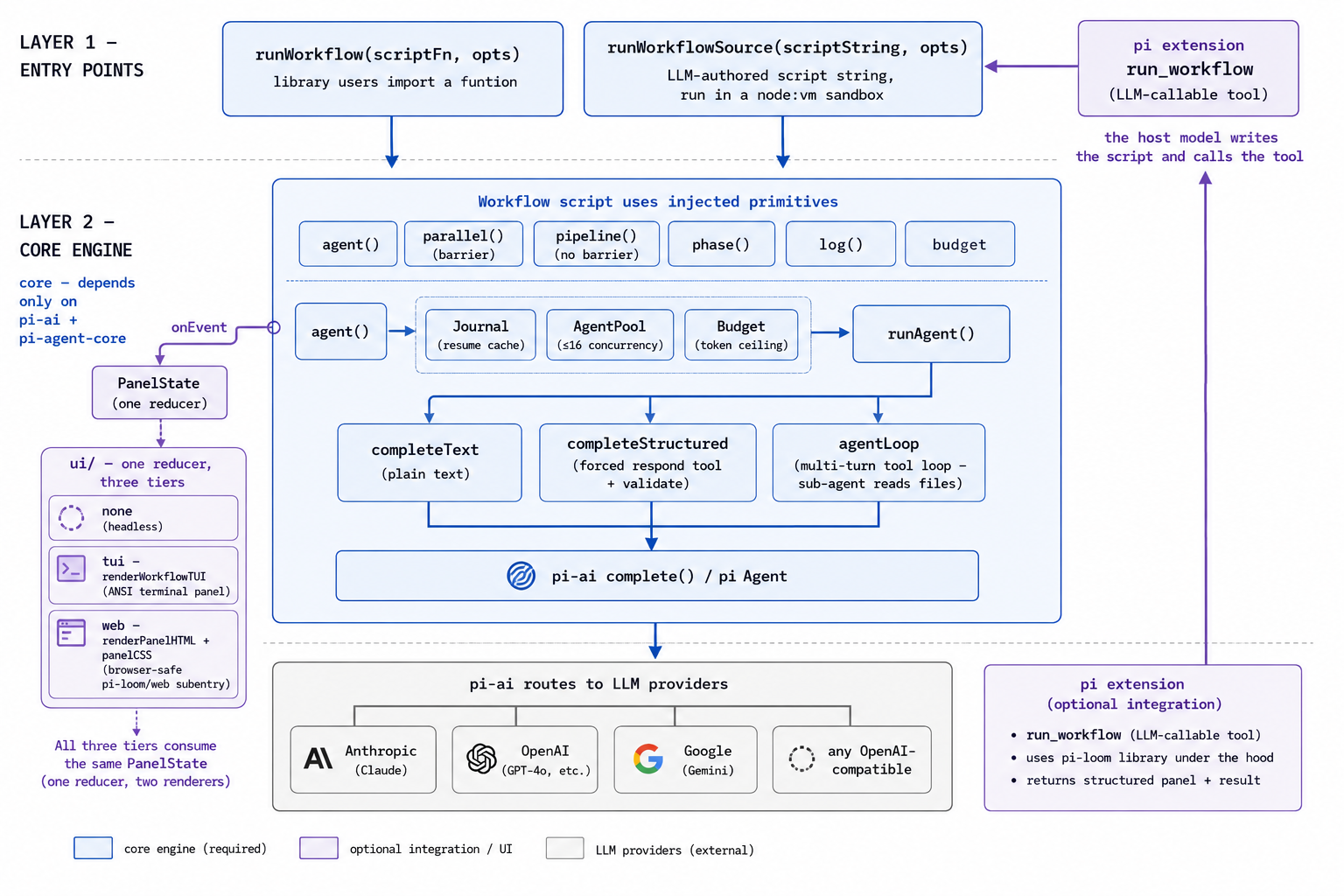
Its design goal is: to give people already using pi to build agents a run_workflow tool—the user says in natural language “use a workflow to audit this repo’s authentication,” the model of the pi host decides whether to call this tool and generates the orchestration script, and the engine then executes it. This path has already been validated end-to-end once inside a pi-based host: the host model autonomously called run_workflow, the dispatched subagents really read the code, and the progress panel rendered in real time by phase. But this is only validation on a single host, and does not represent an already-polished, mature product path.
Currently implemented:
- The
agent/parallel/pipeline/phase/log/budgetprimitives; - Structured output based on JSON Schema (note: in the current version, the two paths—”structured output” and “letting subagents read files with tools”—cannot yet be combined; this is a known limitation);
- Resumable runs (also with some uncovered edge cases);
- A progress UI mirroring the official progress panel: it reduces run events into a panel state, then renders it as a terminal interface or a web interface (the two are isomorphic)—at the start of a run it lists all phases, under each phase it shows the subagents it dispatched, and marks them as done on completion;
- Scripts execute in a
node:vmsandbox, and the parsing phase statically intercepts calls likeDate.now()andMath.random()that break reproducibility. The purpose of this sandbox is to limit misuse and improve reproducibility, not to be a security boundary—the script is by nature generated by the host’s own model and executed within the host process, and static checks can still be bypassed.
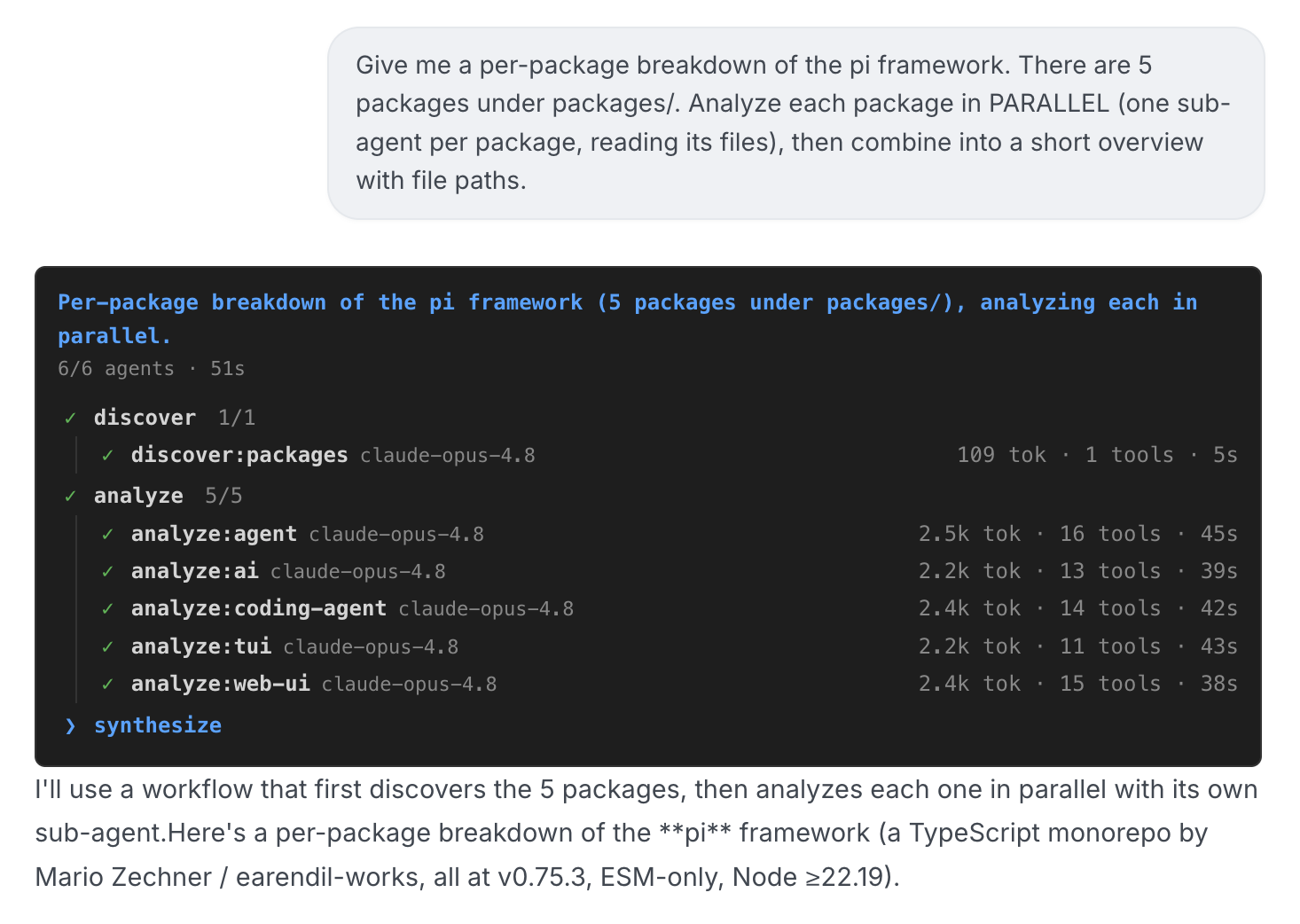
As shown in the screenshot above, this is a web panel actually produced inside a pi-based host: all phases are laid out as a tree, with five subagents expanding in parallel under one phase, each carrying a model name, token count, and elapsed time.
This part is a pi-based engineering implementation; it does not represent the official one, and it has not yet reached the level of a “complete replica.” It’s open-sourced in the hope that people using pi can keep improving on this basis.
Repository: https://github.com/betaHi/pi-loom
Conclusion
The core of dynamic workflows can be boiled down to that official sentence: “A workflow moves the plan into code.” It is not meant to replace the agent loop, but to provide a more reproducible, more scalable structure for “big tasks a single agent can’t finish in one pass.”
The scenarios it suits are stated clearly by the official source: codebase-level audits, migrations across large numbers of files, and research that needs multi-party cross-verification. Its costs are equally clear: it consumes more tokens, is slower, and requires thinking through up front how to split up the task.
In practice, you can first run /deep-research through once to build intuition, then read the five patterns in anthropic-cookbook; after that, pick LangGraph or LlamaIndex Workflows and run a small example. To implement similar capabilities yourself, you can use the Agent SDK (or my pi-loom) plus an orchestration layer.
References
- Release announcement
- Workflow docs (overview / triggering / runtime mechanics)
- Creating custom subagents
- “Building effective agents”
- “How we built our multi-agent research system”
About the special source “the tool spec”: This article’s function signatures (Section 3.6) and the verbatim text of the seven quality patterns (Section 4.1) come from the spec that ships with the Claude Code workflow tool—that is, the model-facing instructions attached to the tool when it is handed to the model, which are neither implementation source code nor public documentation.
- Limitation: These instructions are not visible through public channels, so the original text cannot be verified verbatim.
- Indirect verification you can do: while Claude is writing a workflow, click View raw script, or read the script file it saves locally (path of the form
~/.claude/projects/<project>/<session>/workflows/scripts/<workflow-name>-<runId>.js) to see which functions it actually uses and how—this can corroborate the shape of the API, but cannot prove the verbatim wording of the instructions.
So please treat this part of the article as “a paraphrase based on the tool spec,” rather than public documentation you can verify with one click.